Querying Alarm Type and Alarm Severity IDs
This article describes how to query the alarm type ID and alarm severity ID of created alarm rules.
Prerequisites
Before you begin, ensure the following:
Your current account has been assigned the required asset permissions and operation permissions, including the menu group containing Alarm Rule. If not assigned, contact the OU administrator.
You have created an alarm trigger rule. For more information, see Creating an Alarm Trigger Rule.
Querying Identifiers
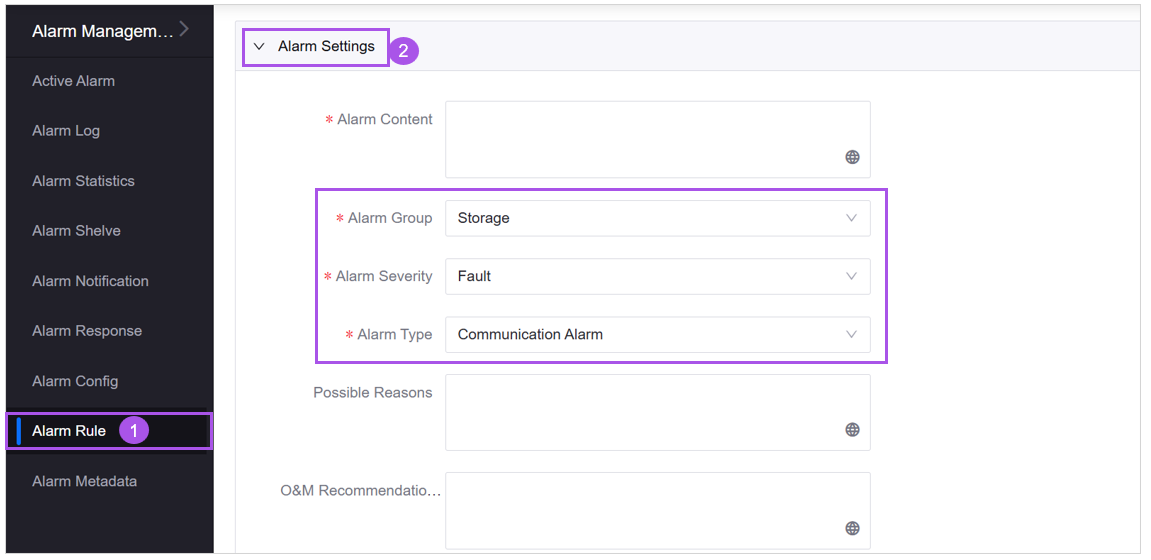
Go to the Alarm Rule page, find your target alarm rule, and select
 to open the Edit Rule page.
In the Alarm Settings section, find Alarm Group, Alarm Severity, and Alarm Type. As shown in the following example, the Alarm Group for this rule is “Storage”, the Alarm Severity is “Fault”, and the Alarm Type is “Communication Alarm”.
Select Alarm Metadata in the navigation bar.
In the Alarm Metadata page, select the Alarm Severity or Alarm Type tab.
Find the target Alarm Group (for example, “Storage”) and expand the group details.
In the list expanded below, you can find the identifiers (IDs) corresponding to the alarm severity/types. For example, under the “Storage” alarm group, you can see the identifier for the Alarm Severity “Fault”.

