Guidelines for Creating Property Rules
In Model Management, Property Rules define how data is mapped and transformed between models or within a single model, ensuring accurate data transmission and usage.
This document explains the application scenarios, creation principles, and examples for property rules.
Key Concepts
Understanding the following concepts will help clarify the role of property rules:
Device: An entity capable of transmitting data over a network and interacting with the IoT platform. The field names and formats are determined by the device manufacturer.
Model: Abstracts device differences and complex business logic, serving different purposes in various scenarios.
Inheritance Chain: The parent-child relationship between models. For example,
A1is a parent model, andA1-1is its child. All ancestors and descendants of these models belong to the same inheritance chain.Expression: The calculation logic for data mapping. In cross-model property rules, expressions are categorized by data flow direction:
Upstream Expression: Logic for parsing device-uploaded data. Defines the transformation logic from the mapped model (onboarding model) to the current model (business model). When a device uploads data through the onboarding model, the upstream expression maps the properties from the onboarding model to the current model, enabling business applications to obtain data in the expected semantics and format.
Downstream Expression: Logic for processing cloud-issued control commands. Defines the transformation logic from the current model (business model) to the mapped model (onboarding model). When an application issues control commands through the business model, the downstream expression maps the properties from the business model to the onboarding model, sending correct control instructions to the device.
For more details, see Property Rule Expression Description.
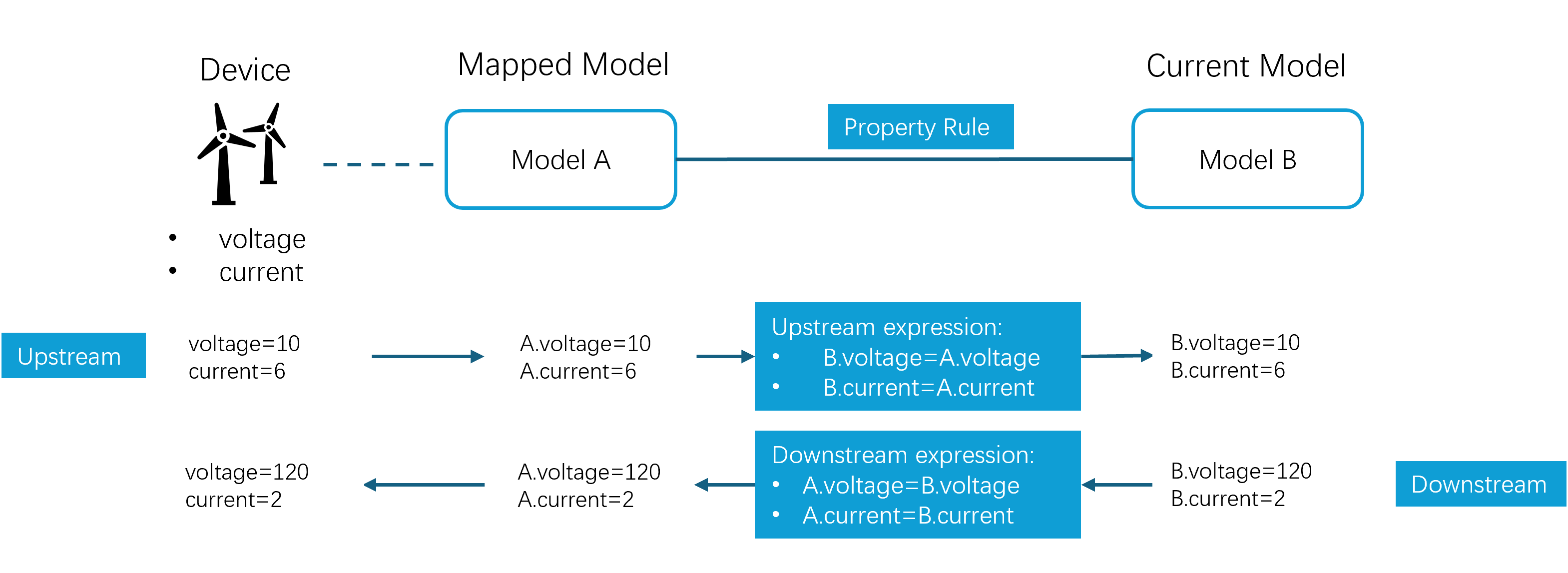
When to Create Property Rules
Property rules fall into two categories:
Default Rules: Rules that are built-in the current model for lightweight calculations and field enhancement.
Example:
power_kW = power_W / 1000converts power from watts to kilowatts.Cross-Model Rules: When multiple models share the same device data, you can perform field mapping and semantic conversion by cross-model property rules.
Example: A device connects via Model A, while an application consumes data from Model B. A mapping between A and B ensures the application uses Model B semantics.
Principles for Creating Cross-Model Rules
Follow these principles when creating cross-model property rules:
Parent Models First
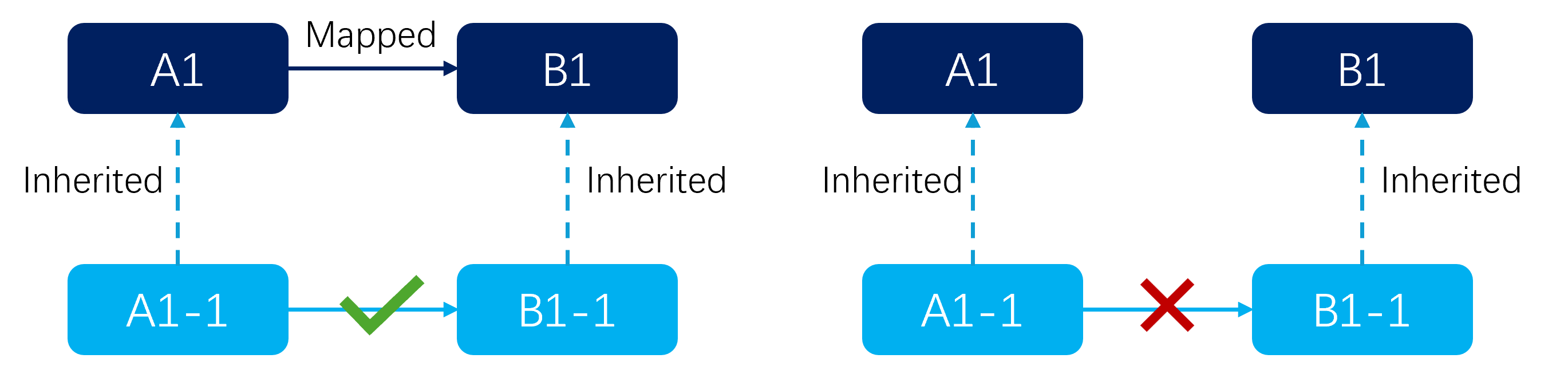
Rules between child models must be based on existing rules between their parent models.
Example: : Create A1 → B1 before A1-1 → B1-1.
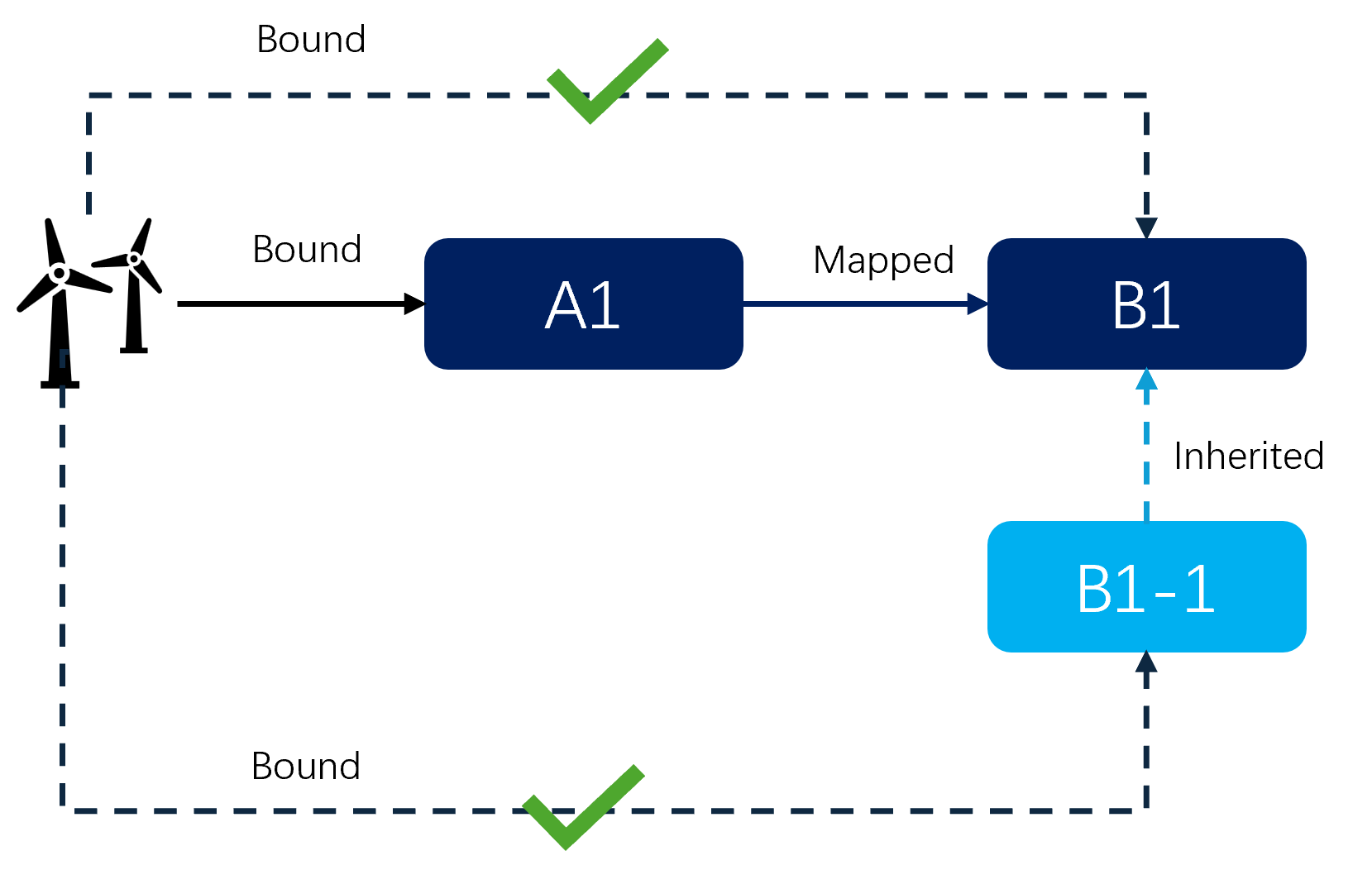
Once parent models are mapped, devices of source models can be bound to the target models and their child models.
Example: : If A1 → B1 exists, devices bound with A1 can bind B1 or B1-1 in the same time to share device data.
Single-Side Configuration, Two-Way Mapping
Configure mapping rules in the target model, including both upstream and downstream expressions in the same rule to avoid confusion.
Example: To map
A1.temperaturetoB1.roomTemp, configure in B1’s Property Rule page, select A1 as the mapping model, and add both expressions.Avoid Duplicate Mapping
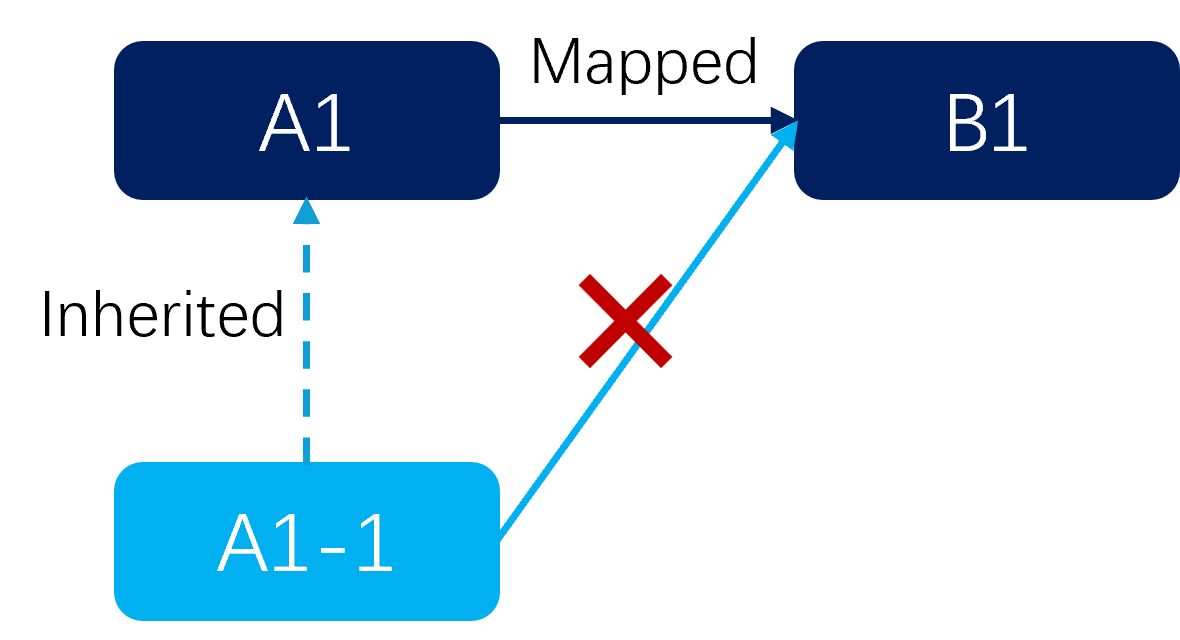
If a model is selected as a mapping model, other models in its inheritance chain cannot be selected again to prevent conflicts.
Example: If B1 maps A1, you cannot also map A1-1 or A1’s ancestors in B1.
Field Compatibility
Field types and semantics must match and respect data direction.
Example: Device reports
power(W), business model requiresPower(kW). You can configure the rulePower = power / 1000.Unique Source
Each target field must have a single upstream source to avoid ambiguity.
Upstream and Downstream Expressions in Cross-Model Rules
In cross-model rules, you need to configure upstream and downstream expressions separately to support the complete interaction flow of device data.
Upstream Expression
Purpose: Parse device-uploaded data.
Definition: The transformation logic from the mapped model (onboarding model) to the current model (business model). When a device uploads data through the onboarding model, the upstream expression maps the properties from the onboarding model to the current model, enabling business applications to obtain data in the expected semantics and format.
Use Cases: When a device is onboarded using an onboarding model, but the business needs to bind or rebind to a business model to obtain data in a specific format or semantics. For example, a device uploads power in watts (W), but the business model requires power in kilowatts (kW).
Configuration Method:
In the current model (business model), create a cross-model rule and select the mapping model (onboarding model).
Write an upstream expression for the target property in the business model. The expression should include one or more properties from the onboarding model.
Expression format:
target property = <expression containing properties from the onboarding model>, for example,"power_kW" = "onboarding_model.power_W" / 1000.
Validation Rules (both attributes and measurement points are supported):
The expression can include one or more properties from the mapping model, or one or more properties from the current model (for auxiliary calculations).
The expression can use properties, measurement points, constants, and functions.
If the target property is an attribute, all properties in the expression must be attributes.
If the target property is a measurement point, the properties in the expression can be a mix of measurement points and attributes.
Circular dependencies are not supported (e.g.,
A = B, B = C, C = A).
Downstream Expression
Purpose: Process cloud-issued control commands.
Definition: The transformation logic from the current model (business model) to the mapped model (onboarding model). When an application issues control commands through the business model, the downstream expression maps the properties from the business model to the onboarding model, sending correct control instructions to the device.
Use Cases: Control commands issued through the business model need to be converted to the correct format and semantics before they can be properly processed by the onboarding model and its associated devices. For example, an application issues a power setpoint in kilowatts (kW), but the device needs to receive the power setpoint in watts (W).
Configuration Method:
In the current model (business model), create a cross-model rule and select the mapping model (onboarding model).
Write a downstream expression for the target property in the business model. The expression must include the target property from the current model.
After the downstream expression, specify the target property in the mapping model.
Expression format:
<expression containing the target property from the current model> => mapping_model.target property, for example,"powerSetpoint_kW" * 1000 => "onboarding_model.P_set_W".
Validation Rules (measurement points only):
Downstream expressions are only supported for measurement points, not for attributes.
The expression must include the target property itself from the current model.
The expression can use properties from the current model, constants, and functions. Direct reference to properties from the mapping model is not supported.
Circular dependencies are not supported.
Examples
Default Rule Example
Device fields:
voltage(V)current(A)
Model A fields:
voltagecurrentpower_W(W)
You should configure a default rule in Model A:
power_W = voltage * current
Cross-Model Rule Example
Device fields:
voltage(V)current(A)P_set(W, writable)
Model A fields:
voltagecurrentP_set_Wpower_W(W): default rulepower_W = voltage * current
Model B fields:
power_kW(kW)powerSetpoint_kW(kW)
You should configure a cross-model rule in Model B:
Upstream Expression:
power_kW = A.power_W / 1000Downstream Expression:
A.P_set_W = B.powerSetpoint_kW * 1000
Data will flow after configuration like below:
Upstream:
Device reports: voltage = 500 V, current = 10 A
↓
Model A: power_W = 500 * 10 = 5000 W (model internal rule)
↓
Model B: power_kW = 5000 / 1000 = 5 kW (cross-model upstream expression)
Downstream:
Model B: powerSetpoint_kW = 6 (application issues control command)
↓
Model A: A.P_set_W = 6 * 1000 = 6000 W (cross-model downstream expression)
↓
Device receives: P_set = 6000 W
By configuring these rules, the system and applications can derive power_kW from device data and send control commands seamlessly. Both upstream and downstream are maintained in the same rule.
Importing and Exporting Property Rules
Property rules support import and export functionality for easy backup, migration, and batch management.
File Format: Import and export use CSV or Excel format. Cross-model rules include the following fields:
expressionRead: Upstream expression (corresponding to “Upstream Expression” in the UI)expressionWrite: Downstream expression (corresponding to “Downstream Expression” in the UI)Other metadata fields: mapping model, target property, property type, etc.
For the expression field in old-version template files, the system will automatically treat it as the expressionRead field.